
API Versioning
Understand how Printeers versions the API, the release cycle, and what to expect when upgrading.
The Printeers API follows Semantic Versioning. Beta preview releases use the -beta suffix (e.g., 2.0.0-beta.1).
Selecting a Version
The API version is specified in the URL path:
- V2 (stable):
https://api.printeers.com/v2/...recommended for new integrations. - V1 (legacy):
https://api.printeers.com/v1/...maintained during the deprecation period.
Each major version has its own base path. Minor and patch versions are applied automatically: you always get the latest release within your chosen major version.
Version Lifecycle
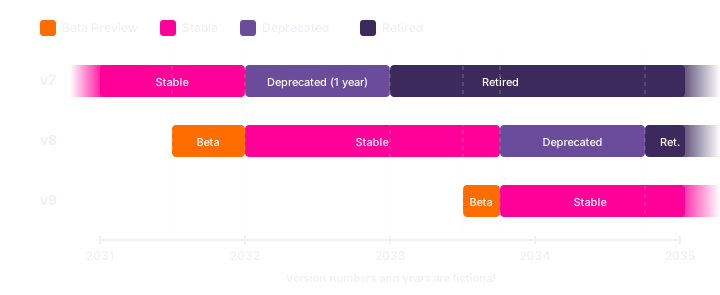
The following diagram illustrates how API versions progress through their lifecycle:
Beta Preview
New major versions are first released as a public beta preview. During the beta phase:
- The current stable version becomes frozen (no new features).
- New features are added only to the beta preview.
- Bug fixes and security patches continue for the frozen version.
Stable
Once a beta preview is declared stable (the -beta suffix is removed), new non-breaking features are added through minor version increments. Breaking changes are reserved for the next major version.
Forward Compatibility Within a Major Version
The OpenAPI spec is designed so that you can keep using a version of the spec you downloaded last month, last quarter, or last year against the live server, as long as you stay within the same major version. The spec uses two OpenAPI conventions to make this possible:
- Response schemas are open. They follow OpenAPI's default of allowing undocumented additional properties (
additionalProperties: true). The server may add new fields to a response in a minor version, and a client that generated its types from an older spec will simply ignore those fields when decoding. No client update is required. - Request schemas are strict. They set
additionalProperties: false. The server rejects undocumented fields in request bodies. This catches typos (customIdentfierinstead ofcustomIdentifier) and obsolete fields you forgot to remove, at the API boundary instead of silently misbehaving.
This split, "open in what you accept, strict in what you require", is what keeps your integration stable across non-breaking server changes. To benefit from it, your client must tolerate the changes listed below without treating them as breaking.
Non-breaking changes you must tolerate
Within a single major version, we may make any of the following additive changes. None of them are considered breaking, and we may ship them in any minor or patch release:
- New response fields. We may add new fields to any response body. Your decoder must ignore unknown fields rather than rejecting them. Most JSON libraries do this by default; some "strict" modes need to be turned off.
- New optional request fields. We may accept new optional fields on existing endpoints. Existing clients that do not send them continue to work unchanged.
- New endpoints. We may add new endpoints under the same major-version base path.
- New values for already-extensible enums. Each enum in the spec is marked as either strict (fixed set; we will not add values within a major version) or open (designed to grow; new values may appear without notice). Examples of open enums:
Claimcategoryreferences (always fetch dynamically),Store.integration(documented as free-form), and thecodefield in error responses. Examples of strict enums:OrderStatusCode,RenderStatus,ShippingLevel,ShipmentKind. For open enums your client must handle unknown values gracefully, typically by treating them as a generic fallback or by passing the raw string through to your UI. - New error codes. We may add new
codevalues for existing HTTP status responses on existing endpoints. - Relaxed validation. A field may become accepted in more situations than before (e.g. wider character set, longer max length).
If your client tolerates the above, it remains compatible across all minor and patch releases of a major version, even if you never re-download the spec.
Some operational details may also change without being considered a breaking change:
- Rate limits. The set of rate-limit policies, their quotas, refill windows, and which endpoints consume from which buckets may all change as traffic patterns evolve. Your integration should always rely on the values returned in the
X-RateLimit-PolicyandX-RateLimitresponse headers, never on hard-coded numbers. See the Rate Limiting guide.
Deprecation
When a new major version becomes stable, the previous major version enters a one-year deprecation period before being retired.
During this period:
- The deprecated version continues to function normally.
- Security patches are applied as needed.
- No new features or non-critical bug fixes are made.
Release Cadence
V1 maintained backwards compatibility for nearly 10 years. While we're proud of that stability, it resulted in a larger gap between V1 and V2.
Going forward, we may release new major versions occasionally; roughly once per year at most. When we do, each release will contain only a few breaking changes, keeping upgrades simple. Combined with the one-year deprecation period, you'll always have plenty of time to migrate.
Changelog
Each version has a changelog documenting all changes. For major versions, the changelog includes migration information:
- Breaking changes and how to address them.
- Deprecated endpoints and their replacements.
- New required fields or changed data formats.
Review the changelog before upgrading to understand what has changed and what actions you need to take.
Staying Informed
We notify API users about upcoming changes via email. Major releases, deprecation notices, and security advisories are sent to the email addresses configured in your organization.
Beta Feedback
We encourage API users to test beta versions before they become stable. If you encounter issues or have feedback:
- Report bugs via support@printeers.com.
- Include your organization name and the beta version number in your report.